# ASA Cluster Settings

## ***Server Settings:***

| Server Difficulty = 7  | Harvest = 3x                                   | Taming = 15x                                                           |
| ---------------------- | ---------------------------------------------- | ---------------------------------------------------------------------- |
| Experience gained = 4x | Loot crate quality = 2x                        | Fishing quality = 3x                                                   |
| Breeding = 15x         | Egg Hatch = 15x                                | Baby Mature = 15x                                                      |
| Server Dino Cap = 5k   | Tribal Dino Cap = 250 AWAKE Per Tribe Per Map. | Tribal Dino Cap in Storage = 1800 Stored Per Tribe Per Map. (Soulpods) |

*You will find your tribal Dino cap in the center of your inventory screen. (Your total cryochamber count will not show in any screens. You will have to keep track via folders and checking your storage inventories)*

#### ***Other Server Settings***

#### Character Levels:

&#x20;As of March 2025, the maximum player level is 195: survivors start at level 1, 104 levels can be gained normally, 15 by defeating the [![](https://ark.wiki.gg/images/thumb/Overseer.png/20px-Overseer.png?ba7a69)](https://ark.wiki.gg/wiki/Overseer) [Overseer](https://ark.wiki.gg/wiki/Overseer) on Alpha difficulty, 15 for defeating the [![](https://ark.wiki.gg/images/thumb/Manticore.png/20px-Manticore.png?5ecc3a)](https://ark.wiki.gg/wiki/Manticore) [Manticore](https://ark.wiki.gg/wiki/Manticore) on alpha difficulty, 15 for defeating [![](https://ark.wiki.gg/images/thumb/Rockwell.png/20px-Rockwell.png?5fddd6)](https://ark.wiki.gg/wiki/Rockwell) [Rockwell](https://ark.wiki.gg/wiki/Rockwell) on Alpha difficulty, 15 for defeating the [![](https://ark.wiki.gg/images/thumb/King_Titan.png/20px-King_Titan.png?f0b60f)](https://ark.wiki.gg/wiki/King_Titan) [King Titan](https://ark.wiki.gg/wiki/King_Titan) on Alpha difficulty 10 for collecting all [Explorer Notes](https://ark.wiki.gg/wiki/Explorer_Notes) on [The Island](https://ark.wiki.gg/wiki/The_Island), [Scorched Earth](https://ark.wiki.gg/wiki/Scorched_Earth), [Aberration](https://ark.wiki.gg/wiki/Aberration) and [Extinction](https://ark.wiki.gg/wiki/Extinction), 5 by levelling up a [Chibi](https://ark.wiki.gg/wiki/Chibi), 5 each for collecting all of the [Bob's Tall Tales](https://ark.wiki.gg/wiki/Bob%27s_Tall_Tales) explorer notes on each map the DLC is featured on ([Scorched Earth](https://ark.wiki.gg/wiki/Scorched_Earth), [Aberration](https://ark.wiki.gg/wiki/Aberration), and [Extinction](https://ark.wiki.gg/wiki/Extinction)).

| Requirement                                                      | Level Gain | Total |
| ---------------------------------------------------------------- | ---------- | ----- |
| Normal levelling                                                 | 104        | 105   |
| Slaying the Alpha Overseer                                       | 15         | 120   |
| Slaying the Alpha Manticore                                      | 15         | 135   |
| Collecting all Bob's Tall Tales Explorer Notes on Scorched Earth | 5          | 140   |
| Slaying alpha Rockwell                                           | 15         | 155   |
| Collecting all Bob's Tall Tales Explorer Notes on Aberration     | 5          | 160   |
| Slaying the Alpha King Titan                                     | 15         | 175   |
| Collecting all Bob's Tall Tales Explorer Notes on Extinction     | 5          | 180   |
| Collecting all normal Explorer Notes                             | 10         | 190   |
| Levelling your Chibi to level 6                                  | 5          | 195   |

#### Creature Levels:

#### Tameable Creature Max Levels:

**Wild Dinos/Creatures spawn with a level of 5 to 210 in our arks.** The max level for most wild creatures is 30 times the difficulty value (215  on our servers) and 30 times the difficulty value plus 1 for Tek Creatures (253 on our servers). After taming, the additional levels coming by taming efficiency can increase the tame level by half of wild level value minus 1.

However, in certain areas of the game such specific challenging caves, wild creatures will spawn at higher levels, nevertheless such creatures cannot be tamed.

The following dino/creatures are an exception:\
(Other levels apply like every other dino based on difficulty setting however.)

* Wyvern, Rock Drake, and VoidWyrm - 5 to 266
* Specific event creatures like GachaClaus - 50 to 900
* All Corrupted Creatures - 1 to 500+ (If spawned from Orbital Supply Drop or  Element Node, depending on difficulty.)
* All Tek Creatures - 20% higher level (7 to 253)
* All Titans - 1500 to 2350
* Titanosaurs - 1 to 7
* Leedsichthys, and Alpha Leedsichthys - 1 (ignores difficulty setting)

#### POST Tamed Dino Levels:

Creatures can level up 88 times. Once your creature has reached this limit, they will not be able to level up anymore.

* Tek creatures - As stated above, they can naturally spawn up to 253 with a maximum taming efficiency of +89 levels and up to 88 levels after taming, making their max possible level 430 outside of breeding.
* Reaper Kings - Queens spawn at a maximum level of 210, but their offspring can receive up to 75 additional levels during pregnancy and another 88 once matured, making their max level 372.
* Enforcers and Scouts - Spawn naturally up to level 210 and can receive an additional 88 levels after being assembled, making their max level 298.
* &#x20;Deinonychus Egg - naturally spawn up to 210 and can receive an additional 88 levels after maturation, making their max level 298 outside of breeding.

## ASA Dinos, and Where they Spawn!&#x20;

Our ASA Cluster Sports Unique ASA Creatures that spawn only on certain maps. While only spawning on certain maps, these creatures can be transferred to most of our other maps. We have used server settings to move some map Unique dinos to our different Cluster maps.&#x20;

We also offer Unique Modded Creatures that spawn specified maps. Denoted with a 💎symbol.\
MOST  Modded Dinos can be transferred to any other map, **EXCEPT Aberration.**

#### List of Creatures&#x20;

**Breeding Level Caps:** On our servers, Creatures have NO hard-capped limit on breeding. Levels of 1750 to 1800 is possible (maxing all stats at 254 x 7 +1 =Maxed out dino of 1750) .

**PLEASE NOTE:** Once you have reached a Dino with 255 in each stat value. You realistically cannot add any more domestication level points into that specific stat. If done, the stat will revert to a LEVEL ONE DINO value in that stat. And you will lose all the value of months of breeding.

{% tabs %}
{% tab title="Free Additional Creature's " %}
Acrocanthosaurus\
Archelon\
Bison\
Cat\
Ceratosaurus\
Cryolophosaurus\
Deinosuchus\
Deinotherium\
Dreadnoughtus\
Fasolasuchus\
Gigantoraptor\
Helicoprion\
Megaraptor\
Palaeoctopus\
Shastasaurus\
Xiphactinus\
Yi Ling
{% endtab %}

{% tab title="Paid within Free Maps" %}

Armadoggo &#x20;\
Burrowbuck\
Cosmo\
Drakeling\
Dreadmare\
Elderclaw\
Oasisaur\
Pyromane\
Sir-5rM8
{% endtab %}

{% tab title="Astraeous" %}
Boaratos (BOSS)\
Grand Tortugar\
Kirayli (BOSS)\
Maeguana\
Minotaur\
Rhyniognatha Drone\
Skeleton
{% endtab %}

{% tab title="Lost Colony" %}
Aureliax\
Cryolophosaurus\
Gigadesmodus\
Gloon\
Malwyn\
Neophyte\
Ossidon\
Solwyn\
Thrall\
Veilwyn
{% endtab %}

{% tab title="Genesis 1" %}

{% endtab %}

{% tab title="Genesis 2" %}

{% endtab %}
{% endtabs %}

***

## **SUBSCRIBED MODS**&#x20;

**There are two ways to get the mod for the servers.**

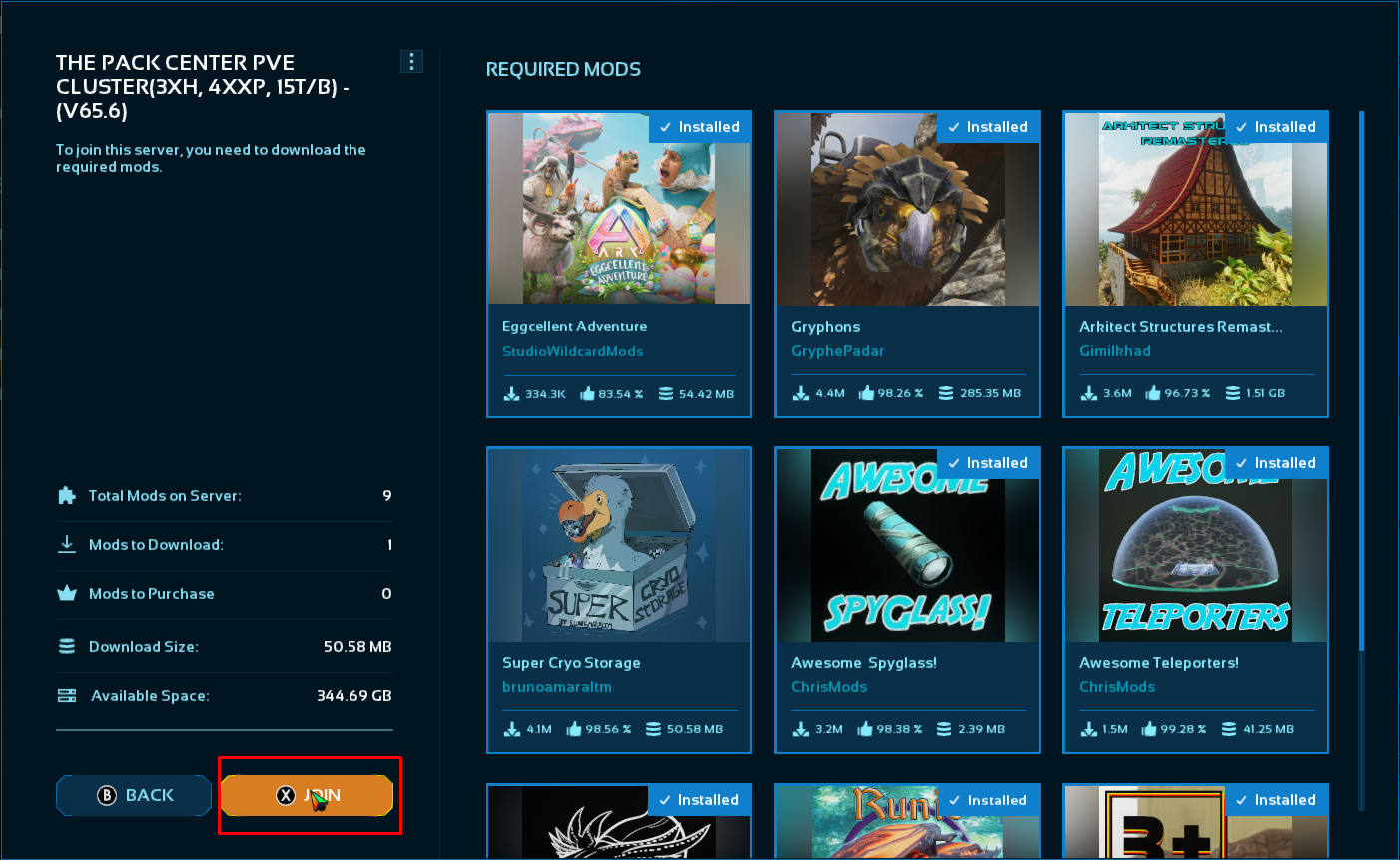
* Just load into ASA, go to the server browser, find The Pack servers, Click Join on the one you want, it opens a menu with a list of all the mods, Click Join and it will then install all the mods before loading into the server. If it times out, repeat the process. After all the mods are installed you can just join.

<figure><img src="/files/Itl6LIX0v9K4oNgsoGve" alt=""><figcaption></figcaption></figure>

* **OR** Add one by one from the Quick List below, (this is a bit tedious by the way).

#### **Quick List of Mods**

**Click on a Mod's Card to go to the Curse Forge Page.**

<table data-view="cards"><thead><tr><th></th><th></th><th></th><th data-hidden data-card-target data-type="content-ref"></th><th data-hidden data-card-cover data-type="files"></th></tr></thead><tbody><tr><td><strong>B+ Structures: ID#990263</strong></td><td></td><td></td><td><a href="https://legacy.curseforge.com/ark-survival-ascended/mods/boss-mod">https://legacy.curseforge.com/ark-survival-ascended/mods/boss-mod</a></td><td><a href="/files/TDBr79zP2rMJ4MKBqGWl">/files/TDBr79zP2rMJ4MKBqGWl</a></td></tr><tr><td><strong>Super Cryo Storage: ID#933099</strong></td><td></td><td></td><td><a href="https://legacy.curseforge.com/ark-survival-ascended/mods/super-cryo-storage">https://legacy.curseforge.com/ark-survival-ascended/mods/super-cryo-storage</a></td><td><a href="/files/jj6d3jUsOsrfOKWRBieB">/files/jj6d3jUsOsrfOKWRBieB</a></td></tr><tr><td><strong>Awesome Teleporters: ID#950914</strong></td><td></td><td></td><td><a href="https://legacy.curseforge.com/ark-survival-ascended/mods/awesometeleporters">https://legacy.curseforge.com/ark-survival-ascended/mods/awesometeleporters</a></td><td><a href="/files/8AT04yPjeS4CGMw6w315">/files/8AT04yPjeS4CGMw6w315</a></td></tr><tr><td><strong>Awesome SpyGlass:</strong> <br><strong>ID#947033</strong></td><td></td><td></td><td><a href="https://legacy.curseforge.com/ark-survival-ascended/mods/awesomespyglass">https://legacy.curseforge.com/ark-survival-ascended/mods/awesomespyglass</a></td><td><a href="/files/oqH5sorQcTTT7BANhuqF">/files/oqH5sorQcTTT7BANhuqF</a></td></tr><tr><td><strong>Draconis Glaucus:</strong> <br><strong>ID#955932</strong></td><td></td><td></td><td></td><td><a href="/files/iao6aAHwok846uoOO0OI">/files/iao6aAHwok846uoOO0OI</a></td></tr><tr><td><h4>Runic Wyverns</h4><p><strong>ID#974884</strong></p></td><td></td><td></td><td><a href="https://www.curseforge.com/ark-survival-ascended/mods/runic-wyverns">https://www.curseforge.com/ark-survival-ascended/mods/runic-wyverns</a></td><td><a href="/files/LvKSqafQSKokL6RuhUYF">/files/LvKSqafQSKokL6RuhUYF</a></td></tr><tr><td><strong>Astraeos - Mythological Creatures ID#1122696</strong></td><td></td><td></td><td><a href="https://legacy.curseforge.com/ark-survival-ascended/mods/astraeos-mythological-creatures">https://legacy.curseforge.com/ark-survival-ascended/mods/astraeos-mythological-creatures</a></td><td><a href="/files/25roFql3wWIlkaBKzTa9">/files/25roFql3wWIlkaBKzTa9</a></td></tr><tr><td><strong>Cliffans Horses</strong></td><td><strong>ID#936001</strong></td><td></td><td><a href="https://legacy.curseforge.com/ark-survival-ascended/mods/cliffans-horses">https://legacy.curseforge.com/ark-survival-ascended/mods/cliffans-horses</a></td><td><a href="/files/4hYpY4TzbR9cW5NljvEU">/files/4hYpY4TzbR9cW5NljvEU</a></td></tr></tbody></table>

## How to Manually Update Mods in ARK: Survival Ascended.

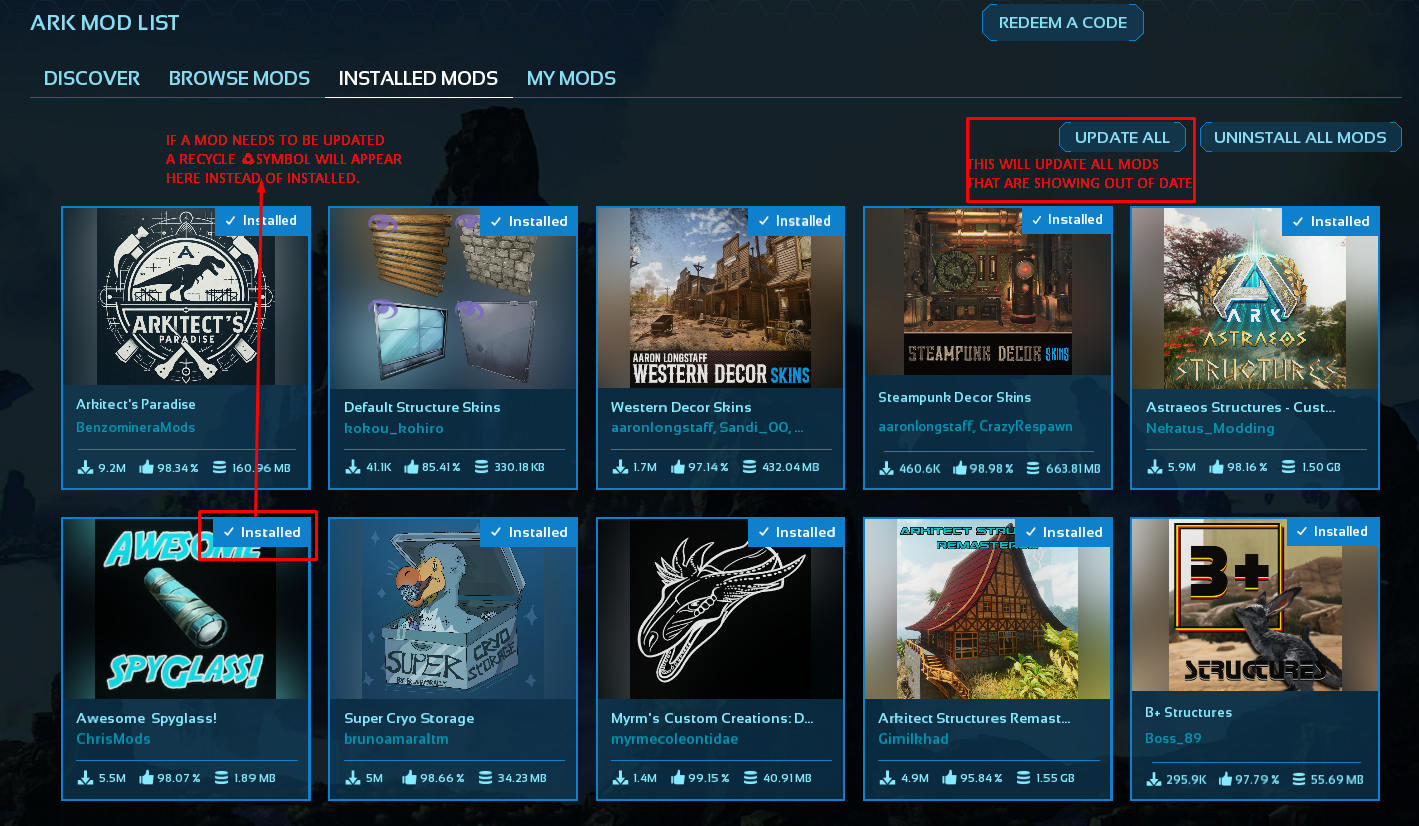
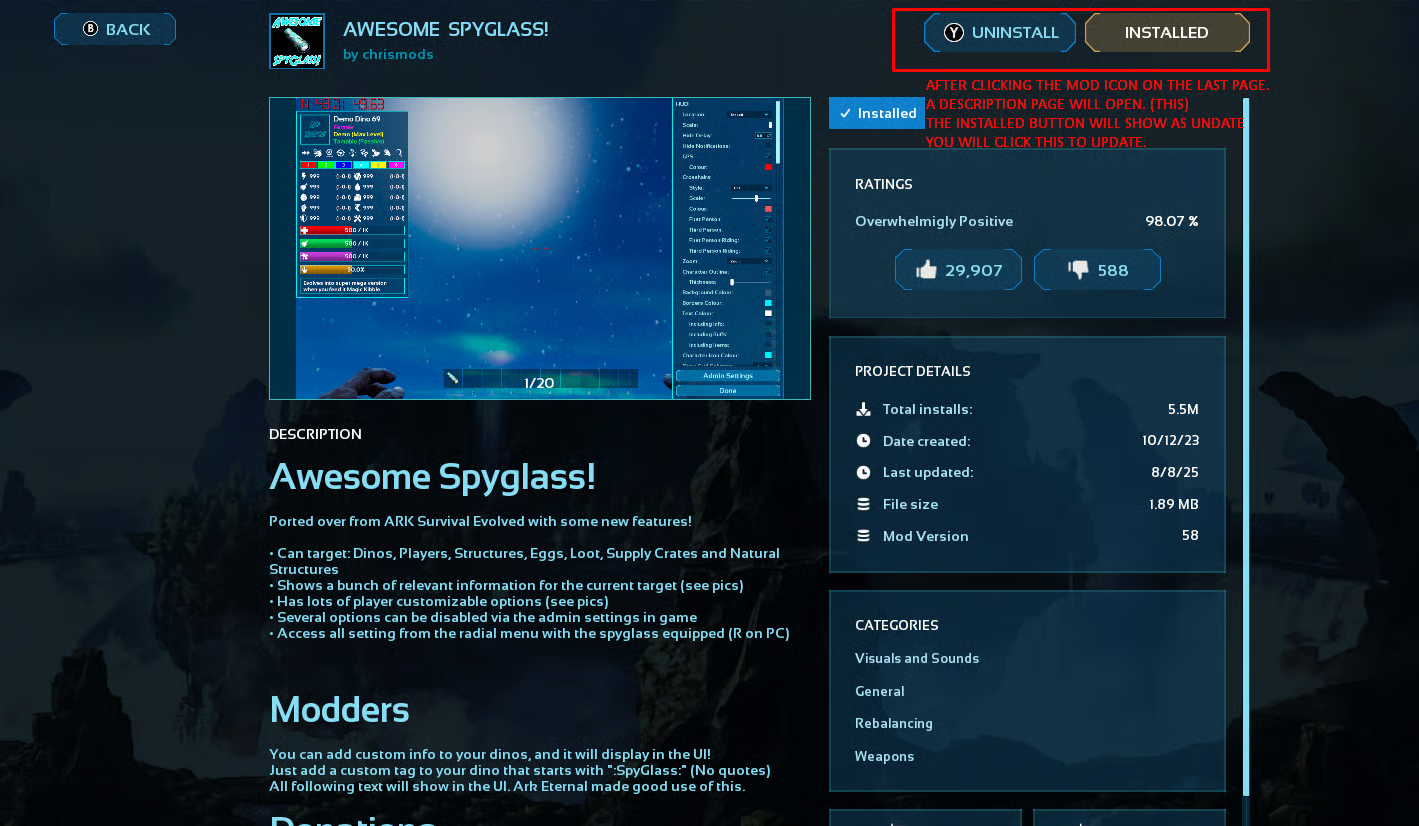
To update mods in ARK: Survival Ascended, you need to navigate to the Mod Settings within the game's main menu. From there, you can access the "Get Mods" section, where you'll find a list of installed mods. If a mod is out of date, it will be indicated with a recycling symbol; clicking on it and then selecting "Update" will initiate the update process.

### Detailed Steps:

* Start the game and go to the main menu.  Navigate to "Create/Resume Game".
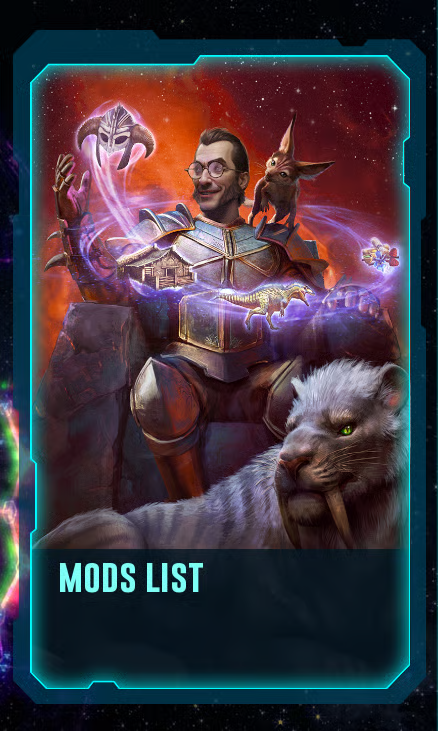
* Select the "Mod List" tab.

<div align="left"><figure><img src="/files/rGXL4Cz6nIhDeTBbMpbd" alt="" width="110"><figcaption></figcaption></figure></div>

* Go to the "Installed Mods" tab.

<div align="left"><figure><img src="/files/D6nHk9s1rzrVhSnxaz5v" alt="" width="352"><figcaption></figcaption></figure></div>

* Locate the mod you want to update. If it's out of date, it will have a recycling symbol next to it.

<div align="left"><figure><img src="/files/f7O6qSYm6zS8Zc75VtYH" alt="" width="563"><figcaption></figcaption></figure></div>

* Click on the out-of-date mod.
* Click the "Update" button in the top right.

<div align="left"><figure><img src="/files/4IZxAoUhGQhNUtKlyWN2" alt="" width="563"><figcaption></figcaption></figure></div>

***

## B+ Structures Disabled:

These items are either overly OP for our cluster, OR we already have systems in place that make them redundant.

* B+ Harvester; B+ Item Collector; B+ Propagator;&#x20;
* B+ Tek Alarm; B+ Transmutator; B+ Vivarium
* B+ Saddles; and B+ ARMOR.

### B+ Tips and Tricks:

**For Dedicated Storage**,\
If you are using them, put your materials down in another box, take 1 of each, and organize it the way you want. When done with said set up, hold e, click consolidate, and it will pull all your materials to the boxes.

### SCS Automated Farming:

**Fertilizer SCS terminal**\
Use SCS terminal with 3-5 podded beetles. The easiest way to obtain large amounts of medium animal feces is taming 3-5 Phiomia, pod them up and put in a terminal. A good ratio is 1 Beetle to 1 Phiomia. Set the terminal to collect poop. It will then make fertilizer and put it in the plots in its range. Use the B+ Omni tool to move the fertilizer into crop plots out of the terminal range. You can also upload the fertilizer to a B+ Dedicated Storage.

**Resource Gacha SCS Terminal**\
**No more tall towers of gacha and snow owls! Gachas can generate resources in the terminal!!** \
**NOTE: ONE Gacha Farm Terminal per Main base limited to 50 gacha!**\
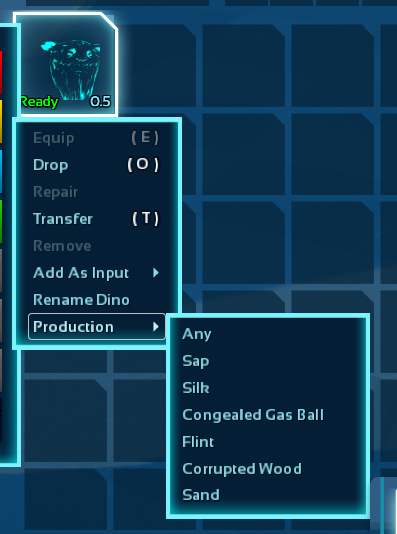
Turn on resource gathering in terminal. Don't turn on poop or there won't be room for the resources.&#x20;Set each gacha to the specific resource before podding and placing in the terminal. Or set the terminal selector for each gacha. Use the B+ Omni tool to move crystals to the crackers, then wirelessly send items to storage units within 80 foundations.)  NO CROP plots needed, NO PELLETS needed. Terminals will fill up, and after 300 Full slots and gachas will no longer produce resources.

\**These settings are on each Gacha in the terminal.*

<div align="left"><figure><img src="/files/9BbJMA6UscNDq6e1N4uj" alt="" width="199"><figcaption></figcaption></figure></div>

You can add the following tames for the additional allowed resources they produce, either gender.  Depending on specific dino placed within the terminal. Upload to dedicated storage is enabled.\
Dinos shown will generate Cement paste, golden eggs, honey, bison milk, cerato spines, bio toxin, algae, and feathers.

<div align="left"><figure><img src="/files/EkNTrGU1mDtQnqf5ocjR" alt="" width="155"><figcaption></figcaption></figure></div>

**Kibble Farm**\
Place 2-3 **females** of each kibble dino or 5 Maeguna along with a oviraptor to boost egg production. Turn on unfertilized egg gathering in terminal. Don't turn on poop or there won't be room for the eggs.&#x20;You will have eggs for kibble / extraordinary kibble in a few days. (Maeguna make the eggs for extraordinary kibbles!) You can move eggs to the Refrigerator or into Dedi storage with the B+ Omni tool.\
\**Image is from ASE, but you can use whichever dinos currently exist in ASA for eggs.*\
![](/files/285TvyALJ7otQMkouDUc)

***

## ASA Dinos, and Where they Spawn!&#x20;

Our ASA Cluster Sports Unique ASA Creatures that spawn only on certain maps. While only spawning on certain maps, these creatures can be transferred to most of our other maps. We have used server settings to move some map Unique dinos to our different Cluster maps.&#x20;

We also offer Unique Modded Creatures that spawn specified maps. Denoted with a 💎symbol.\
MOST  Modded Dinos can be transferred to any other map, **EXCEPT Aberration.**

#### List of Creatures&#x20;

{% tabs %}
{% tab title="Free Additional Creature's " %}
Acrocanthosaurus\
Archelon\
Bison\
Cat\
Ceratosaurus\
Cryolophosaurus\
Deinosuchus\
Deinotherium\
Dreadnoughtus\
Fasolasuchus\
Gigantoraptor\
Helicoprion\
Megaraptor\
Palaeoctopus\
Shastasaurus\
Xiphactinus\
Yi Ling
{% endtab %}

{% tab title="Paid within Free Maps" %}

Armadoggo &#x20;\
Burrowbuck\
Cosmo\
Drakeling\
Dreadmare\
Elderclaw\
Oasisaur\
Pyromane\
Sir-5rM8
{% endtab %}

{% tab title="Astraeous" %}
Boaratos (BOSS)\
Grand Tortugar\
Kirayli (BOSS)\
Maeguana\
Minotaur\
Rhyniognatha Drone\
Skeleton
{% endtab %}

{% tab title="Lost Colony" %}
Aureliax\
Cryolophosaurus\
Gigadesmodus\
Gloon\
Malwyn\
Neophyte\
Ossidon\
Solwyn\
Thrall\
Veilwyn
{% endtab %}

{% tab title="Genesis 1" %}

{% endtab %}

{% tab title="Genesis 2" %}

{% endtab %}
{% endtabs %}

## Custom Cosmetics to Enhance your ASA Experience.

<figure><img src="/files/zGF2R7nhcw7Oingpr8hD" alt="" width="375"><figcaption></figcaption></figure>

The new "Custom Cosmetic" system allows players to dynamically apply player-generated costumes to players and dinos, end-user-created skins to armors and weapons, and end-user-created skins to all the game's structures. In most cases your client will automatically download them in the background when encountered during gameplay. NOT the full mod but an OVER view so you may see them in your subscribed mods in the Client Mod Panel.

The PACK has curated a Free list that is available to download that is approved for use ("Whitelisted") on our Servers. We have disabled Dynamic download to just the official mods, and our curated list. Due to the many issues around the COSMETIC system.

**Approved for use on The Pack cluster.**

<table data-view="cards"><thead><tr><th></th><th></th><th data-hidden data-card-cover data-type="files"></th><th data-hidden data-card-target data-type="content-ref"></th></tr></thead><tbody><tr><td><strong>Default Structure Skins</strong></td><td>A custom cosmetic mod that applies vanilla structure skins to many structures.</td><td><a href="/files/GMaczEbpGNNAhJDwCmmJ">/files/GMaczEbpGNNAhJDwCmmJ</a></td><td><a href="https://legacy.curseforge.com/ark-survival-ascended/mods/default-structure-skins">https://legacy.curseforge.com/ark-survival-ascended/mods/default-structure-skins</a></td></tr><tr><td><strong>Arkitect's Paradise</strong></td><td>A custom cosmetic mod that will try to make your old prehistoric world a bit more modern.<br>All building skins are perfectly seamless which means your base will look like one structure.<br><strong>Approved for official.</strong></td><td><a href="/files/PIq1wUezTUNK0eleLtlc">/files/PIq1wUezTUNK0eleLtlc</a></td><td><a href="https://legacy.curseforge.com/ark-survival-ascended/mods/arkitects-paradise">https://legacy.curseforge.com/ark-survival-ascended/mods/arkitects-paradise</a></td></tr><tr><td><strong>Western Decor Skins</strong></td><td>Now you can decorate your Ark with western-style items, all available as skins for your existing structures.</td><td><a href="/files/jzFp8sVv9D19l7kj7CXq">/files/jzFp8sVv9D19l7kj7CXq</a></td><td><a href="https://legacy.curseforge.com/ark-survival-ascended/mods/western-decor-skins">https://legacy.curseforge.com/ark-survival-ascended/mods/western-decor-skins</a></td></tr><tr><td><strong>Steampunk Decor Skins</strong></td><td>Now you can decorate your Ark with Steampunk-style items, all available as skins for your existing structures.</td><td><a href="/files/GZp030cOX8d683sHLgCD">/files/GZp030cOX8d683sHLgCD</a></td><td><a href="https://legacy.curseforge.com/ark-survival-ascended/mods/steampunk-decor-skins">https://legacy.curseforge.com/ark-survival-ascended/mods/steampunk-decor-skins</a></td></tr><tr><td><strong>Astraeos Structures - Custom Cosmetic</strong></td><td>A full greek styled structure skin set</td><td><a href="/files/brFg0AtLjeCLHC9rO6Bq">/files/brFg0AtLjeCLHC9rO6Bq</a></td><td><a href="https://legacy.curseforge.com/ark-survival-ascended/mods/astraeos-structures-custom-cosmetic">https://legacy.curseforge.com/ark-survival-ascended/mods/astraeos-structures-custom-cosmetic</a></td></tr><tr><td><strong>Astraeos - Wardrobe</strong></td><td>Greek inspired Armor Skins.</td><td><a href="/files/6IwikuTLLN8BGFQogynu">/files/6IwikuTLLN8BGFQogynu</a></td><td><a href="https://legacy.curseforge.com/ark-survival-ascended/mods/astraeos-armor-skins">https://legacy.curseforge.com/ark-survival-ascended/mods/astraeos-armor-skins</a></td></tr><tr><td><strong>ZUZ Structure Cosmetics</strong></td><td></td><td><a href="/files/U9zfTLRMVNGPBGQqx71H">/files/U9zfTLRMVNGPBGQqx71H</a></td><td><a href="https://legacy.curseforge.com/ark-survival-ascended/mods/zuz-structure-cosmetics/screenshots">https://legacy.curseforge.com/ark-survival-ascended/mods/zuz-structure-cosmetics/screenshots</a></td></tr></tbody></table>

***

<figure><img src="/files/3ntCe00AtJjsKiRqHkim" alt=""><figcaption></figcaption></figure>

### Helpful Guides to ASA Play

<table data-view="cards"><thead><tr><th></th><th></th><th></th><th data-hidden data-card-cover data-type="image">Cover image</th><th data-hidden data-card-target data-type="content-ref"></th></tr></thead><tbody><tr><td>The PACK ASA: Breeding Guide</td><td></td><td>Click to go to the Guide!</td><td><a href="/files/6tilvXWXzgmE9s4NMHtm">/files/6tilvXWXzgmE9s4NMHtm</a></td><td><a href="https://faq.thepackgaming.com/ark/player-guides/breeding">https://faq.thepackgaming.com/ark/player-guides/breeding</a></td></tr><tr><td>ASA Explorer Notes</td><td></td><td>Click to go to the Guide!</td><td><a href="/files/SCzf7dbG0QSyBPgYNF1c">/files/SCzf7dbG0QSyBPgYNF1c</a></td><td><a href="https://faq.thepackgaming.com/ark/player-guides/notes">https://faq.thepackgaming.com/ark/player-guides/notes</a></td></tr><tr><td><strong>ASA Community Wiki</strong></td><td></td><td>Click to go to the Guide!</td><td><a href="/files/2a4X0qvnUiguDOJ5fWwt">/files/2a4X0qvnUiguDOJ5fWwt</a></td><td><a href="https://ark.wiki.gg/wiki/ARK_Wiki">https://ark.wiki.gg/wiki/ARK_Wiki</a></td></tr><tr><td><strong>Wikily.gg</strong></td><td>Discover tools, interactive maps, and guides for ARK: Survival Ascended  </td><td>Level up your gameplay at  <em>Wikily.gg</em>!</td><td><a href="/files/s2cC2r3sk62fWh3fEVOq">/files/s2cC2r3sk62fWh3fEVOq</a></td><td><a href="https://wikily.gg/ark-survival-ascended/">https://wikily.gg/ark-survival-ascended/</a></td></tr></tbody></table>

***

<figure><img src="https://lh7-rt.googleusercontent.com/docsz/AD_4nXeN-ooW4HLRMm0VUuJhggu7pGAA182adNaKvKVgM4Jx5MD51vJT3EYQkwblETC7ggY96Yz1D5lSwQQY0XMREpugDsTDJXy2fYcyLU-5OSXvJ43Tslyukwnb6Z6U-fXtzqbbj29n4Q?key=GlTRPaxhvh8su6YjSiXOAg" alt=""><figcaption></figcaption></figure>

All content on this page has been accumulated from several places including the Wiki, The PACK Admin Team, and Players from The Pack cluster.

<br>


---

# Agent Instructions: Querying This Documentation

If you need additional information that is not directly available in this page, you can query the documentation dynamically by asking a question.

Perform an HTTP GET request on the current page URL with the `ask` query parameter:

```
GET https://faq.thepackgaming.com/ark/asa-cluster/asa-settings.md?ask=<question>
```

The question should be specific, self-contained, and written in natural language.
The response will contain a direct answer to the question and relevant excerpts and sources from the documentation.

Use this mechanism when the answer is not explicitly present in the current page, you need clarification or additional context, or you want to retrieve related documentation sections.